
- The University of Oxford employs monitoring and wake-on-LAN services to help the campus community reduce the energy consumed by idle computers.
- The complexity of the IT infrastructure across the university requires relying on people to turn off their own computers after work each day, although some colleges and departments could use automatic power management.
- To encourage people to engage with green computing, Oxford is promoting a five-step process, rather than the use of specific technologies.
The government of the United Kingdom has set a target to reduce CO2 emissions by at least 34 percent from 1990 levels by 2020. The Carbon Reduction Commitment (CRC) will require all large public and private sector organizations across the U.K. to cut carbon emissions and report total CO2 emissions annually so that the data can be published in a league table. IT professionals clearly have a significant role to play in helping organizations perform effectively within this framework:
- Minimize energy consumption by idle devices, specifically desktop computers and laptops.
- Reduce, reuse, recycle, and buy the greenest equipment — and only when necessary.
- Consolidate servers and manage optimized virtual infrastructures.
- Consolidate applications by promoting the use of shared services.
- Build and manage more efficient data centers.
- Consolidate data centers, locate them in colder climates (where there is less need to cool them), and power them with green energy.
- Reduce travel by using remote communication technologies.
- “De-materialize” processes, for example by moving to a paperless office.
- Install sensors and controls that enable more efficient management of building services.
- Implement new computing infrastructures such as more use of mobile devices or thin clients.
The project reported on in this article considers the first of these initiatives, specifically how to minimize the power consumed by desktop computers at the University of Oxford.
If left on all the time, an 80 watt desktop computer and 25 watt monitor will consume 920 kWh over a year. The same equipment will consume about 198 kWh if switched off at the end of each working day. This reduction currently equates to a saving of £87 and 387 kg carbon dioxide equivalents (CO2 eq) per computer per annum. According to the Joint Information Systems Committee (JISC) publication “Sustainable IT in Further and Higher Education: SusteIT Final Report,” further and higher education organizations in the U.K. own about 1,470,000 computers, thus this simple change in power management equates to an annual saving of about £127,000,000 and 570,000,000 kg CO2 eq. Obviously there are many assumptions built into this calculation, but we think that at least half of this saving is realizable.
At education sector IT events over the past two years we have asked delegates to raise their hands to indicate which best described the approach to desktop computer power management within their group:
- Leave desktop computers switched on all the time (~30 percent)
- Power down desktop computers at the end of the day (~20 percent)
- No identifiable policy or common practice (~50 percent)
We then asked people to raise their hands if they thought their group should adopt a policy to ensure that the campus community safely and reliably powers down idle computers. One hundred percent agreed.
Initiating Green Desktop Computing at Oxford
The University of Oxford encompasses more than 100 autonomous groups (colleges, departments, libraries, museums, and so forth), most of which manage their own IT systems. The different groups have significant variations in hardware, operating systems, installed applications, and central management software (for software updates and data backup, for example). Of course, people and groups also differ in their requirements of IT services and skills. At Oxford, as in many large organizations, one approach rarely suits all.
In 2006 the Environmental Change Institute asked Computing Services to develop tools and techniques for reducing the energy consumed by desktop computers at the University of Oxford. Together with the Oxford e-Research Centre and the Estates Directorate, the two groups submitted a proposal to the Joint Information Systems Committee (JISC) for funding under its Institutional Exemplars program. JISC chose to fund the project to demonstrate an approach to green desktop computing in a complex institutional environment.
About the Technology
Most computers can easily be configured to go into S3 (sleep/standby) and S4 (hibernate) power-saving modes automatically. This typically means reducing power consumption to below 5 watts. IT managers often disable this power management setting because it can:
- Prevent remote access by users
- Prevent remote access by third-party services such as software update and backup
- Interfere with services such as shared network drives
(Lisa Hopkins and her colleagues at the University of Liverpool describe these issues in detail on the University of Liverpool’s Computing Services PowerDown web page and the British Computer Society also has a good article.)
We concluded that the easiest, safest, and most reliable way to reduce IT-related energy consumption by idle computers, across all types of operating system and hardware, is to ask people to switch off their computers at the end of each working day. Turning off computers might cause problems, though, if central services need them to be on when performing backups or installing software updates; if people are unhappy waiting for their computers to boot and login scripts to run (which can take from 90 seconds to 20 minutes); or if users require remote access (from home, for instance, or when away at a conference). Actually getting computers switched off might not be easy either, if people forget or object to switching their computers off manually. In addition, it is difficult for an automatic process to know when a computer is truly idle (for example, avoid switching off a computer that has an experiment running overnight).
To encourage users across the university to adopt the practice of switching computers off at the end of the working day, we developed monitoring and wake-on-LAN services (WOL).2 IT staff can provide both services to their users by installing open-source software we simply call monitoring and WOL “gateways.” Computing Services provides full instructions on how to do this, and the monitoring and WOL software is freely available under an open source license.3
Monitoring
The monitoring service uses Address Request Protocol (ARP) queries to gather and plot the number of devices with IP addresses throughout the day and night. (We use ARP because it provides higher accuracy than normal scanning protocols such as Ping.) The resulting graph shows the number of computers that are switched on throughout the day and can be used to estimate how much energy is being wasted by idle computers.
People can access the monitoring service graph via a web page, allowing them to easily see how well their green desktop computing initiative is being implemented. We reason that if people can see that their effort (switching computers on and off) is being reciprocated by others, they are more likely to continue contributing to the initiative.
Wake on LAN
The WOL service allows computers to be switched on remotely:
- Just before they are accessed by third-party services, such as for a scheduled backup
- By people when they are away from the office, such as an academic using a laptop to log into their office computer when away at a conference
- Automatically each morning to reduce the time a person needs to wait for them to start up
Figure 1 illustrates the technical design of the WOL service. The green person icon at the left represents a user, who can log into the registration service via a web page. Users can then register and switch on their computers using the central WOL service, which relays wake up commands or “magic packets” to computers via the gateway server software. The HFS (Hierarchical File Server)4 backup service can also use the WOL service to switch computers on just before they are scheduled for backup.
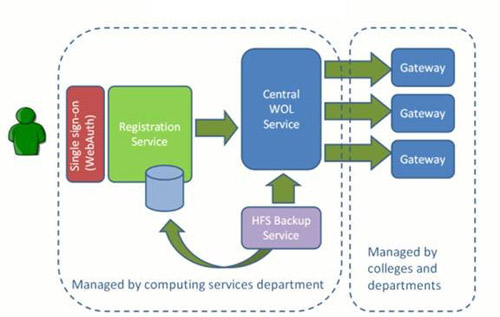
Figure 1. Schematic Representation of the Wake on LAN Infrastructure
Five Steps to Green Office Computing
Our goal is to encourage as many groups across the university as possible to engage with green desktop computing. To achieve this, we are promoting a five-step process:
- Estimate how much electricity your desktop computers consume if (a) left on all the time versus (b) switched off at the end of each day.
- Research what other groups have done.
- Implement tools and define techniques that reduce the amount of time computers sit idle while consuming power.
- Communicate clearly with others in your group on how they can support this initiative.
- Share experiences of implementing the initiative through web pages created for that purpose.
In practice this typically means:
- Spend about 20 minutes estimating costs of your computers’ power consumption and CO2 emissions.
- Spend 1–4 hours installinga gateway server to provide the monitoring and WOL services.
- Wait a few days for monitoring data to be plotted, then decide on a course of action:
- If all computers are consistently switched off overnight, uninstall the gateway server software.
- If a significant number of computers are left on, keep the gateway server and send out a link to the monitoring graph on a regular basis to encourage people to switch off their computers of their own accord.
- If significant numbers of computers are still left on, the IT manager can:
- Offer the WOL service to help encourage people to switch their computers off.
- Allow the backup service to use WOL to switch computers on just before a backup is scheduled
- Install tools that automatically turn computers off.
- Buy a commercial solution that makes automatic power-saving modes (S3: sleep/standby) a possibility
- Explain clearly what is expected of people in the group, for example if they are expected to switch their office computers off, log out of shared computers and enable sleep mode on monitors.
- Write up the approach in the form of a case study to join a web collection of green desktop computing case studies maintained by Computing Services.
Project Results
The energy manager at the Estates department sends monthly reports to building administrators detailing current energy consumption compared to the same month during the previous year. A group that moves from 200 computers permanently switched on to most computers being switched off at the end of each working day would expect to see a graph like the one in Figure 2, which shows the hypothetical reduction in electricity demand resulting from that change.
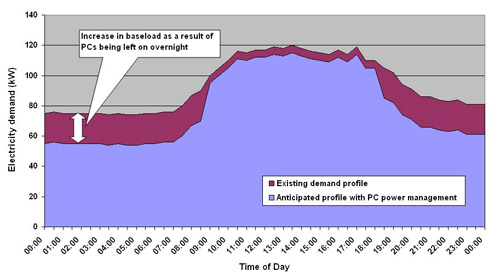
Figure 2. Hypothetical Reduction in Electricity Demand of 200 Desktop Computers Switched Off Overnight Rather than Left On
Energy prices in the U.K. have fluctuated significantly over the past two years (£0.08 to £0.12 per kWh) and will continue to change in the near future.5 If left on all the time, an 80 watt computer and 25 watt monitor will currently cost about £110 in energy charges and cause 494 kg CO2 eq to be released into the atmosphere. If switched off at the end of each working day, this equipment will cost about £24 in energy charges and result in 106 kg CO2 eq. A department with 200 computers left on all the time would save about £17,000 and 78,000 kg CO2 eq per annum if staff switched their computers off after work each day. Of course, many assumptions are built into this calculation, some of which are outlined on the Computing Services Sustainable Desktop Computing, Estimates, web page.
Actually observing these results can be difficult because the electricity meters installed in buildings often cover energy supplied to areas with a wide range of uses and devices, such as research equipment in laboratories, office computers, and other machinery. The monitoring service allows us to report the outcome of a green desktop computing initiative by
Figure 3 shows real data from the computing services building over a four-week period in November 2009. Each week is easy to see with the five-fingered peaks and troughs separated by weekends. The significant drop between about ~95 live nodes (computers) and ~40 shows that about half of all staff currently power down their computers regularly overnight. Careful inspection of the graph shows that more computers are left on overnight on Wednesdays compared to other days in the week. This is because computers are left on to allow them to be backed up. We have now developed an interface between the WOL and backup service so that this is no longer necessary. Significantly, many of the colleges will see their monitoring graphs change during term time when students plug laptops into the network. We are currently unsure how students manage the power consumption of their personal equipment, but with over 90 percent of students bringing a laptop, this is likely to be a significant area of focus for a green desktop computing initiative.
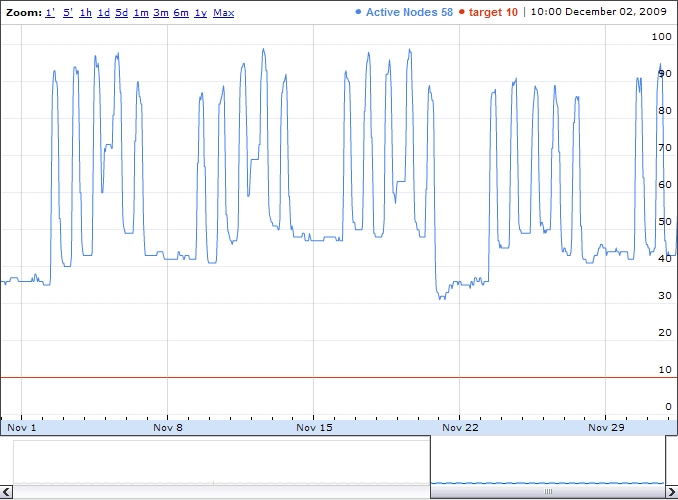
Figure 3. Monitoring Service Graph of Computing Services Devices with IP Addresses, November 2009
The green desktop computing project’s overall goal is to encourage as many groups as possible to engage with the five-step process. We aim to publish case studies that demonstrate how successful we have been in achieving this at the University of Oxford.
Planned Work
To take the project forward we are currently working on the following activities:
- Re-implement the WOL at Liverpool University and change the technical design so that we can offer the service nationally.
- Work with student groups to design a campaign that encourages students to “do their bit.”
- Make agent-based modeling online tutorials that help people understand the interplay between their actions and energy-consuming devices.
Discussion
Anyone who has been involved in implementing an IT project will know its success depends in part on the quality of the service but mostly on the willingness of people to adopt new ways of working. We have discussed the aims of our project with people from a wide range of educational and commercial organizations in the U.K. over the past two years. Table 1 provides a summary of some of the opinions expressed, with a focus on the helpful and unhelpful attitudes.
Table 1. Helpful and Unhelpful Attitudes Affecting the Success of Green IT Projects
| Unhelpful Attitudes | Helpful Attitudes |
| There is no point reducing electricity consumption because soon the government will sanction the building of new nuclear power stations which will provide a plentiful supply of cheap green electricity. | Energy price hikes are likely in the near future. |
| Manmade greenhouse gas emissions are not a problem. | Manmade greenhouse gas emissions are very likely to cause major health, ecological, and economic problems. |
| Scientists will invent new tools and energy sources that will mean we can continue unabated. | People are uncomfortable with an approach to management based on hoping for the best. |
| Whatever we do in the U.K. will be negligible compared to what is happening in China and India. | The current version of the economy embodies an overdependence on finite resources that damage natural ecosystems. |
| Without regulation there is no point in me consuming less; I will just be making things cheaper for other people who don’t care. | Well-designed regulation will benefit the economy. |
| Reducing consumption will be bad for the economy and cause people to lose their jobs. | Consumerism and the economy are not the same thing. |
| The amount of money my department will save is insignificant compared to the loss in terms of my time waiting for a computer to start each morning. | Many people remember rationing and tough economic periods. |
| Myths about computer power management: (a) a computer will use more energy booting up than it will over an entire 24-hour period, therefore it is better to leave it switched on; (b) switching a computer on and off is bad for the hardware etc. | The Iraq war was predominantly a battle for oil reserves — we must do more to avoid future bloodshed over scarce resources. |
| IT managers are not expected to account for energy consumption. | Green practices are good for the perception of an organization’s brand. |
| People like to own the latest gadgets regardless of need. | New green technologies are cool. |
| People generally have a very poor understanding of how much energy devices consume and don’t know how to think about this consumption in terms of costs and greenhouse gas emissions. | Acting ethically is good for staff morale. |
| People generally have no understanding of the environmental considerations associated with the manufacture of digital components, their assembly into computers, and their transport to shops. | Some people have a good understanding of the full life-cycle of computing equipment, from “cradle to cradle” and appreciate that buying fewer goods is at least as important as reducing in-use electricity consumption. |
These comments highlight the fact that managers wanting to implement energy-saving initiatives will need to consider a complex set of often highly emotive attitudes. Perhaps we can learn from the struggle doctors have had with tobacco companies (and corrupt politicians) over the past few decades: it is very easy for a few people to spread doubt about scientific consensus, such as the link between smoking and cancer. Our experience suggests that the success of green projects will depend on our ability to promote better understanding and acceptance of scientific research.
Conclusions
Implementing a robust approach to desktop computer power management across a complex decentralized IT infrastructure is challenging but feasible. At Oxford our approach has been to encourage building administrators and IT staff to work through the five step approach described above. Where automatic power management is not feasible, achieving office-computing energy reductions will depend on many people “doing their bit,” which can be seen as both a problem and opportunity: manually powering down a computer will be an annoyance for some people, but for others it will provide a tangible way to demonstrate their understanding of the issues associated with IT and the environment.
Initial results are encouraging but we still have work to do to achieve the levels of saving we want to achieve. If you would like to learn more about our work, please send e-mail to [email protected].
Acknowledgments
We would like to thank:
- The JISC Institutional Exemplars Programme team
- Lisa Nelson, Liverpool University
- Peter James, SusteIT
- Peter James and Lisa Hopkinson, “Sustainable ICT in Further and Higher Education: A Report for the Joint Information Systems Committee (JISC),” January 13, 2009.
- Wake on LAN (WOL) is a network protocol for switching computers on by sending a “magic packet” to a computer’s network card. It has been around for more than 10 years. There are many ways to implement a WOL service that take advantage of this protocol; our approach simply allows us to provide a WOL that will (a) work across the large number of subnets that exist at the University of Oxford and (b) plug into the existing WebAuth single sign-on authentication system to allow individuals to switch just their computer on via a web browser.
- If you are interested in learning more about the monitoring and WOL software, please send e-mail to [email protected].
- The HFS (Hierarchical File Server) is a centrally funded service providing backup and long-term archive services to senior members, post-graduates, and staff at Oxford University.
- See “Dark Days Ahead,” The Economist, from the August 6, 2009 print edition.
© Howard Noble, Daniel Curtis, and Kang Tang. The text of this article is licensed under the Creative Commons Attribution 3.0 license.