This paper is the intellectual property of the author(s). It was presented at CAUSE98, an EDUCAUSE conference, and is part of that conference's online proceedings. See http://www.educause.edu/copyright.html for additional copyright information.
Web-Based Grade Submission
Alan J Deschner
University of Saskatchewan
Saskatoon
Saskatchewan CANADA
Abstract
Collecting student grades from instructors at the University of Saskatchewan has always been an exercise in moving paper. But with the ubiquity of desktop computers, most grades are now calculated and stored in spreadsheets. And since the final destination is a relational database, the multiple transcriptions and re-keying of grades looked like inefficient busywork.
In the fall of 1996 we embarked on a project to capture grades that are stored electronically on the desktop and keep them in electronic form as they move through various control and approval processes. Desktop constraints dictated a web browser for the user interface. Oracle Webserver provided the link to the databases. Secure Socket Layer (SSL) added encryption. Kerberos provided user authentication.
The system was piloted in December 1997. It has been successful at reducing the elapse time of grade submission from four days to less than one day. Useful lessons have been learned about how to decentralize business processes to a large group.
Background: Grade Submission at the U of S
Up until 1997, the process of collecting grades from faculty and instructors at the University of Saskatchewan was heavily paper-based. A few weeks before the end of classes, a four-part Grade Report Sheet was produced from our database, and sent to departments. Within five days after students wrote their final exams, one of the copies was required back in the Office of the Registrar (O.R.), where staff used data entry screens to key and verify the grades in the database. With some 20,000 students enrolled in over 5,000 classes, this was a major amount of work in the O.R. alone, let alone the effort expended in Department and College offices moving the paper around.
With the ubiquity of personal computers on desktops across campus, it was only natural that many instructors began to record and calculate grades with software tools, notably spreadsheets. Since the official grade sheets were the pre-printed multi-part forms, this created a situation in which the data was transcribed needlessly. Typically, the electronic grades stored in a spreadsheet were printed and given to a secretary to write or type on the forms, which were ultimately used as keying documents to put the grades back into electronic form in our Student Information database.
From a systems perspective, this was inherently inefficient. Essentially, electronic data was being put on paper just to transport it across campus! But isn't that what the network is for?
There were other problems with these processes, as well.
Project Initiation
In 1995 funds were sought by the Office of the Registrar to redesign and automate the grade submission process. Funding was eventually secured and the project started in earnest in October 1996.
The initial project plan called for a number of phases:
This plan was modified somewhat during the course of the project, notably to allow prototyping a web-based system between phases 4 and 5.
The Business Analysis
The first two phases involved numerous interviews with key people in the O.R. and various academic departments across campus. The results were documented using the Oracle Designer/2000 Process Modeler, which we had recently acquired.
Although the central processes were well know and documented, there was very little knowledge of what actually happened to the grade collection forms between the time they left the O.R. and the time they finally returned. We found as many different ways of handling the paper forms as there were academic departments! Some departments left it to their instructors to write the grades directly on the sheets, and were only involved in distributing the completed forms. Other departments had elaborate control procedures involving the various parts of the form. Still others completely handled preparation of the form themselves, getting grade books or printouts from instructors. We even found one department that had two different processes!
We did find several significant uses for the paper forms, other than data collection. Most importantly, it provided a single place where both the instructor and the department head could sign their approval of the grades being submitted for the class. And it provided the historical record in the department of grades and grade distributions in past classes. And finally, the various copies of the form acted as a notification and distribution method for moving grades to other areas of campus, notably college offices to perform degree audit and make graduation decisions. In fact, we discovered that four parts to this form were not enough in all cases!
Ultimately, we developed a new model for grade submission that saw the instructors themselves transferring their grades electronically into a central system. Grades already in electronic form should stay that way. Approval would be electronic as well, requiring an authenticated login by the instructor submitting the grades and the department head approving the grades. Staff in department offices were involved to control the process and identify the grade submitters and grade approvers in the department. The O.R. acted as overall administrators of the process, and dealt with problem cases such as students getting grades in classes for which they are not registered.
In short, we wanted to completely distribute the process, capturing grades electronically as close to the source as possible, and keeping them in electronic form all the way to the students' permanent records.
The Alternatives
Early in the project, we identified several alternatives for delivering this new model, which we considered worthy of further investigation.
However we quickly focused on the Web as the preferred approach, and it became a question of, "why not the web?" There were several very good reasons for only considering a web-based system: we had technical problems on our desktops, with database connectivity, with the files to be uploaded, and with security.
The Web as a Solution to the Desktop Problem
As is the case at many Universities, there is a great diversity of desktop devices in use by our faculty and staff. Until about five years ago, Macintosh was the hardware platform being promoted the most, and many department and college offices adopted them uniformly. But since then, Windows PC's have gained a large presence and are now found on over half the desks on our campus. Some offices have even made the switch from Macs to PC's. Added to this mix are Unix workstations, primarily on faculty desktops in Engineering, Computing Science, Mathematics, and other technical areas. Any system we developed would have to accommodate grades kept on and submitted from all these devices.
In addition to this diversity of desktop devices, there was also the age of the equipment to consider. To a large extent in our Macintosh community, the machines are old, under-powered, and memory starved, at least in their ability to run newer applications. For example, we have Macs that cannot run versions of Netscape above version 2 because of insufficient memory. This is also a problem among PC's, but to a lesser extent. Many PC's are still running Win3.1, and cannot be upgraded to Win95 or WinNT.
It should be mentioned that we also have offices that are primarily using character-cell terminals to access VMS hosts, and occasionally a Unix host. The Office of the Registrar is an example � most clerical staff use VMS-based applications designed for vt220's, and there is little benefit in them moving to PC's or Macs until more applications are available on those platforms. Fortunately, very few instructors were limited to character-cell terminals.
When we started this project, our limited experience with the Oracle Developer/2000 tools was that they produced applications that required a fairly large machine to run on, the bigger the better. There were some questions about support for both 16-bit and 32-bit versions of Windows, with the latter not available in early releases and the former looking like it would not be supported in future releases. And at that time we could not even generate an Oracle*Forms application for Macintosh, although it was promised real soon now.
But on the positive side, the vast majority of desktop devices on campus were already connected to our campus network. And there were plans in place to extend the network into those areas not previously wired. Furthermore, virtually everyone had a web browser already installed.
It was these facts more than any others that drove us to a web-based application. Versions of web browsers are available on all three major platforms: Windows PC's, Macintosh, and all variants of Unix. This holds true as well for the old, under-powered machines, although to support them we could not consider using Java applets. Character cell terminals could connect with Lynx, if supporting them was absolutely necessary.
We see this as the strongest attraction to web-based applications. Differences in computing platforms are no longer relevant when delivered to a web browser using the standard http protocol and html language.
The Web-to-Database Problem
Simply stated, our problem was to find a web development tool that could connect with our database environment, both present and future.
Our existing Student Information database is implemented using Digital's Rdb on VMS, and has been serving us well since 1986. However, Digital sold Rdb and most of its related tools to Oracle Corporation shortly before our project began. The University negotiated a license agreement with Oracle, covering both the Rdb and Oracle database engines and tool sets. We expected that the two products would eventually merge, and we felt we should begin to use the Oracle database engine, since it would likely be the more dominant of the two products, and receive the most attention from the vendor.
Hence there was a large push towards implementing new application systems using Oracle rather than Rdb. In fact, another project was well on its way to implementing a Name and Address database in Oracle. This central database, dubbed UWho, was to contain information on students, alumni and donors, library patrons, employees, suppliers, and anyone else with whom the University does business. This database would be up and running for students and library patrons by the time our system was installed. Furthermore, after a false start running Oracle on VMS, the UWho database was installed on a Sun server running Solaris, Sun's version of Unix.
The reality, then, was that our grade submission system would have to have an interface to an Oracle database on Unix for student and instructor names and addresses, and to an Rdb database on VMS for student records.
In addition, Oracle had a product for web development, at the time named Oracle Webserver (the latest version is called Oracle Application Server). In addition to being a server for standard web pages, this product provided connectivity to programs written in PL/SQL, Oracle's language for stored procedures that execute inside the database. The product provided routines that these PL/SQL procedures could use to create the html for web pages, which were then returned to the user's web browser.
So Oracle Webserver appeared to be exactly what we needed and, because of our stated direction towards using Oracle databases and tools, the question quickly changed from "why not the web?" to "why not Oracle Webserver?"
Left to resolve was how to integrate student records from the VMS-based Rdb database into this Oracle-based environment. Again, an Oracle product looked like it was the solution. Called the Transparent Gateway for Rdb, this product allows one to establish an external link from inside an Oracle database to an Rdb database; the Rdb database is made to look like an Oracle database that is accessible via SQL*Net, Oracle's standard network connectivity tool.
This product worked fairly well, as far as basic functionality was concerned. However, it has what we consider to be a major security hole, requiring very careful configuration in order to limit access to only authorized users. In addition, each time the Gateway was used, it required new processes to be started in VMS, which proved to be a time-consuming operation – we suffer 10 to 20 seconds of overhead in generating each page that requires access to the Student database. A future release of Rdb is promised to use Oracle's SQL*Net directly, removing the need for the Transparent Gateway, but we have not yet been able to make this work in our environment.
The File Upload Problem
Since the grades we wished to capture electronically were most often kept in spreadsheets, we wanted a way to upload a spreadsheet (or an extract from one) to the webserver. Standard html supports a type=file option for the input tag that sends the contents of a local file to the webserver in addition to the file name. Using this tag also puts a Browse button on the page, allowing the user to browse their local file system and pick the file they want.
This feature first appeared in version 2 of Netscape Navigator, and became part of the html standard in version 3. Microsoft, however, did not support this tag until version 4 of Internet Explorer and even then it gave inconsistent results in version 4.0. In any event, IE4 was not available yet when we were developing our system, so we were restricted initially to Netscape browsers.
However, even though this file upload scheme was in the html standard at the time of our project, Oracle Webserver did not support it! When data was posted to the webserver with type=file, only the name of the file was passed along to the PL/SQL program, not the content of the file.
This problem had a rather interesting solution. One of the original developers of Oracle Webserver, Tom Kyte, has added support for file upload as part of work done for another client. His version, called the OWA Replacement Cartridge, is available free of charge. It is a replacement for one of the main executable programs in the Oracle Webserver product (namely OWA, or Oracle Web Agent). It works by capturing the uploaded file as a raw data field in a special database table, then sending the key of the inserted record to the PL/SQL program. The program could then retrieve the image and manipulate it as needed.
Of course, there is no vendor support for the Oracle Webserver product when you use the replacement cartridge (although the author was most helpful when contacted, if he had time). We decided that we could live with this, but that we would only use the replacement cartridge for the file upload step where it was absolutely required, and the regular Oracle Webserver executables for the rest of the system.
One limitation in this implementation of file upload is that the PL/SQL program manipulating the file image cannot retrieve more than 16KB of file data. Since this is rather small as far as spreadsheets are concerned, this limitation forced us back to only uploading text files. Users would have to save their spreadsheets as tab-delimited or comma-delimited text files, and then upload that version.
In fairness, we most likely would have required text file uploads anyway, given the complexity of parsing data in spreadsheets, especially since we would have had to support multiple versions of Excel, Quattro Pro, and Lotus 1-2-3. However, during the project we found that even a tab-delimited version of a typical spreadsheet for our largest classes could exceed 16KB if it contained student names.
It should also be noted that this is not so much a limitation of the Oracle Webserver product, since files larger than 16KB can in fact be uploaded. The limitation is in the PL/SQL language, which does not have a data-type or built-in functions that can manipulate more than 16KB.
In any event, we were able to use these products to effect uploading of grades into our system.
The Security Problem
Security was a major concern while we were designing this system. A recent incident of a system security breach, which resulting in a student attempting to change their grades (and getting caught), brought this to the forefront. Security was a concern on three fronts:
The first of these, user authentication, was definitely the most important. We must know exactly who is using the system, and have assurance that they are who they claim to be. This was essential because we needed to record who submitted grades for a class and who approved them, as a digital replacement for the signatures that used to be on the paper form.
Upon reflection, we realized that a simple username and password were not sufficient. The utility of the system would be greatly enhanced if instructors could submit their grades from off campus, especially for classes offered at remote locations that previously required mail or courier to deliver grades to campus in a timely fashion. Although this is easy for a web-based system, transmissions across the web are normally in plain text and can be viewed by anyone determined to do so. While this was of some concern where the actual grade information is concerned, it was a serious matter for usernames and passwords. If a user's password could be obtained, it could be used to log in and alter grades before they were posted to the permanent records. This was also possible from parts of our campus network, so limiting use to on-campus users was not a solution. Obviously we needed to somehow encrypt at least the username and password as it traveled over the network.
A related threat comes from the ability on the Internet for a server to pretend to be a different server. If someone were to put a computer on the network that pretended to be our webserver, they could capture usernames and passwords as people logged on. So we must have some way to guarantee to the user that the webserver they are contacting is indeed the legitimate University server for grade submission. This is known as server authentication.
It should be noted that once information is on our webserver, we have a completely secure and isolated environment between it and all other central servers we need to use, including the servers where our databases reside. So our security problems were isolated to the final link between the webserver and the browser on the user's desktop.
User Authentication: Kerberos
User authentication was becoming more and more of an issue for us, as various offices around the University put their resources on the web and wanted to control access to them. The usual way of protecting web pages is to define lists of usernames and passwords for the webserver to authenticate. This, however, requires the webmaster to add or remove users and set passwords, and with an anticipated 1,400 users of our system, this would end up being a maintenance nightmare. In addition, this method results in a single user having a vast array of usernames and passwords for all the resources and services they need to use.
The University had long discussed the need for and benefit of a single username and password for each user, and this project seemed like the time to put the infrastructure in place to do just that, at least as far as campus webserver access was concerned. We already had a Kerberos authentication server that was used to authenticate faculty, staff, and student access to our dial-up modem pool, with a large number of users defined on it. And there was also a mechanism for users to change their own Kerberos passwords via a web page, which required little maintenance on our part.
A Kerberos server can generally be used by a webserver for user authentication. One must still keep a list of valid users must, but the webserver is no longer required to authenticate passwords, Kerberos does that. If each web site uses the same username for a person, we achieve the goal of one username and password per person. And since Kerberos can be used by Sun Solaris and other Unix systems and is promised for Windows NT, we have the possibility of using this single username and password for many other logins on campus.
But things never go as smoothly as we think they should. We next discovered that, unlike the Apache Webserver that we normally use, the Oracle Webserver did not support Kerberos authentication. Further, it appeared that Oracle had no plans of adding support for it, especially since they were selling their own Oracle Authentication Server software!
The solution to this was to uncouple the two components of the Oracle Webserver: the front-end that handled http on the network and the back-end that provided the connectivity to the database. The front-end could be replaced by the Apache webserver, although this caused additional overhead. Now the Oracle back-end was being invoked as an ordinary program, and had to attach to the database each time a page was requested. This was tolerable to us, since Oracle had indicated that their Webserver product would support Apache in a future release (it already supported the Netscape front-end). Plus, the overhead was not that great, since both the Oracle Webserver and the target database were running on Sun servers with a reasonable amount of power, and process start-up is very fast in Unix.
Users and Grade Submission Roles
User authentication using Kerberos provides only part of the security needed. It removes password maintenance from our system, but for it to be of use to more generally, everyone on campus would have to have a username and password on our Kerberos server, not just users of our system.
In addition, the Oracle Webserver required that all connections to the database be done as a user identified at startup in a configuration file. So we had no ability to run our programs under the username of the real user.
We do, however, have access to the Kerberos username within our programs. This information is passed by the webserver front-end as cgi environment variables to the Oracle Webserver back-end, which in turn passes them to our programs in the database.
We decided to keep user information directly in our database, and we developed a set of roles that our users could have in the grade submission process. Each role is valid for a particular department. The basic departmental roles are:
In addition, there is an overall System Administrator role, held in the Office of the Registrar, and a General Access role that can view everything and update nothing.
The intent is that a System Administrator will grant Controller and Approver roles to users in a department. The Controller will then grant Submitter, Enterer, and additional Controller roles to others in the department, and the Approver will grant additional Approver roles for backup and/or delegation. This way, no one individual (except the System Administrator) can hold the correct roles to submit and approve grades for a class; it always requires at least two people to be involved.
This distributed authorization scheme would put the control of grade submission in the department offices, where the correct people to be doing the job were known. As was our stated intention, we wanted to capture information as close to the source as possible.
Server Authentication and Encryption: Secure Socket Layer (SSL)
Secure Socket Layer (SSL) is an encryption and authentication method that is available for most webservers, including Apache, Oracle, Netscape, and others. It relies on the web site registering with a trusted third-party Certificate Authority, such as VeriSign Inc., Thawte Consulting, or the Post Office. For a fee, the Certificate Authority issues a certificate that can be used on the web site to negotiate an authenticated, encrypted session with a browser.
Most web browsers come pre-loaded with certificates for the common Certificate Authorities. This allows the process to start from a "trusted" point, namely trusting the Certificate Authority. When the web browser requests a page from a secure server (i.e., SSL enabled), the server tells the browser which Certificate Authority it uses, and the browser can use that Authority's certificate to validate that the server is who it is supposed to be. This solves the third of our security concerns: server authentication.
Once the server is authenticated to the browser, they can use the server's public and private keys to further encrypt all traffic between them. Further, this encryption is in place before any real data is exchanged, including any usernames and passwords that the server requests. This solves the second of our security concerns: encryption.
Again, nothing goes completely smoothly. Certificate Authorities charge by the server, and we wanted to be able to SSL-enable several that were already running on campus, and many more that we expected in the future. The solution to this was to become our own Certificate Authority. One server could be registered with a third-party Certificate Authority, Thawte in our case, and that server could in turn sign certificates for other servers on campus. Unfortunately, this could not be made completely transparent to users, since no browser would come pre-configured with the U of S certificate. Users would have to go to our certificate page and download it. But they would only have to do this once, and then the browser would record the certificate for future use.
We also discovered that older browsers did not come pre-configured with certificates from Thawte Consulting. For example, version 2 of Netscape Navigator was released prior to Thawte even issuing certificates. This could be overcome either by loading the Thawte certificate from their site without authentication, or by accepting the U of S certificate, also without authentication. The latter course was acceptable for computers on campus, because it is very hard, if not impossible, to masquerade locally as our webserver.
Another problem was that Microsoft Internet Explorer for the Macintosh was not capable of downloading any new certificates. This meant that the user would have to accept our site unauthenticated each time they used our system. Again, this would be inconvenient, but not insecure for on-campus use. Encryption would still be in place.
And finally, after we had been installed for a period of time, our U of S certificate expired! This required all our users to download a new version of the certificate and delete the old one. Furthermore, the Thawte certificate that was pre-installed in version 3 of Netscape and Internet Explorer expired in July 1998, requiring all users to re-load that certificate from the Thawte site.
Overall, this security method is not without its maintenance problems. But we do have better security with it than in any other application on campus.
System Configuration
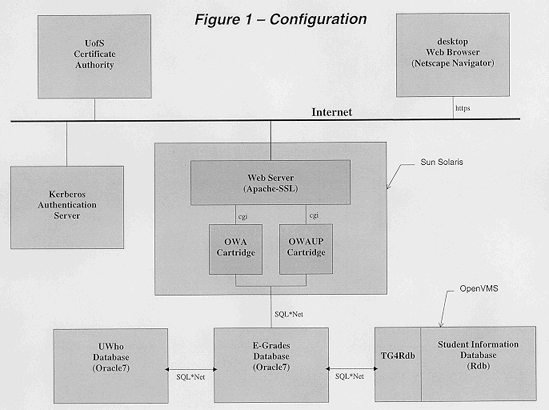
In summary, the following is our hardware and software configuration. Some of these were at lower version levels when we initially installed, and have been upgraded since then to the versions stated here.
Figure 1 at the end of this paper is a diagram of these system components and their relationships.
Basic User Functionality
Having designed the hardware and software configuration to support this system, we eventually had to develop the functionality required by the users. The basic functionality put in place relating to grade submission includes:
In addition, there are a number of control functions to ensure that only authorized people can perform the basic functions, and to otherwise control the system. These include:
Overall, the system consists of 26 PL/SQL programming packages, each containing multiple procedures and functions, which produced a total of 43 distinct web pages.
To assist the user, each web page has a corresponding help page that provides more information on how the particular page is used. We also have the ability to include JavaScript on any page to assist the user in filling out forms, although we only used this in one instance in the original system.
Project Timeline and Product Roll-Out
As mentioned, our project got underway in October 1996. After that, it proceeded as follows:
It is always prudent to go slowly at first, until the real limits of the system are known. However so far we have seen little reason to hold back. The rate of introduction to our users is more related to our ability to organize and train departments than in any fears we have for the technology. In December 1998, the system will be used to capture about 13,500 grades in about 350 classes, twice the number of classes compared to last April, and including some of our largest classes. This will stress the system much more than we have been able to do before, and will give a good indication of where the limits of the system really are.
In Conclusion
Overall, this project has been successful in its original objectives. We now have a secure way to move approved grades electronically from an instructor's desktop into our Student Information database. The system is independent of the device on the desktop, and is not restricted to on-campus use.
The biggest challenge in accomplishing this was integrating the web interface securely into our existing environment. Many small problems were encountered along the way, and all of them were overcome to a greater or lesser extent. In some cases, compromises were made that were acceptable in the short term, but which now must be improved for the long-term.
References
Slides used during the presentation of this paper at the CAUSE'98 Conference
in Seattle, Washington, December 10, 1998
http://www.usask.ca/~deschner/cause98/
Introductory pages for Web-Based Grade Submission at the University of Saskatchewan
http://www.usask.ca/~deschner/egrades/
Oracle Application Server (was Oracle Webserver in v2.1 that we used)
http://www.oracle.com/asd/oas/oas.html
Tom Kyte's OWA Replacement Cartridge
http://govt.us.oracle.com/~oracle/owarepl/doc/
Oracle Transparent Gateways, including the gateway for Rdb
http://www.oracle.com/gateways/html/transparent.html
Specifications for the input type=file html tag, from the Index DOT
Html site
http://www.blooberry.com/html/tagpages/i/inputfile.htm
Apache-SSL webserver with SSLeay encryption
http://www.apache-ssl.org/
SSLeay: SSL add-in for Apache and Certificate Authority software
http://www.psy.uq.oz.au/~ftp/Crypto/
Thawte Digital Certificate Services
http://www.thawte.com/
Contact the author
mailto:[email protected]