What Students Want from Their Instructors (In Their Own Words)
The choices instructors make about using technology in their teaching shape students' overall technology experiences.1 In 2017, a majority of students (65%) told us that most, almost all, or all of their instructors use technology adequately for instruction; 55% said that most or all instructors use technology during class to make connections to learning material or to enhance learning with additional materials. When it comes to instructors' use of technology, students want more use of technology that offers practical solutions for the business of being a student.
Overall Results
The top three technologies that students told us they wanted instructors to use more were lecture capture; free, web-based content to supplement course-related materials; and early-alert systems designed to catch potential academic trouble (see figure 3). Students want their instructors to use technology that can assist them in accessing information (e.g., grades) or completing tasks (e.g., studying or submitting assignments).
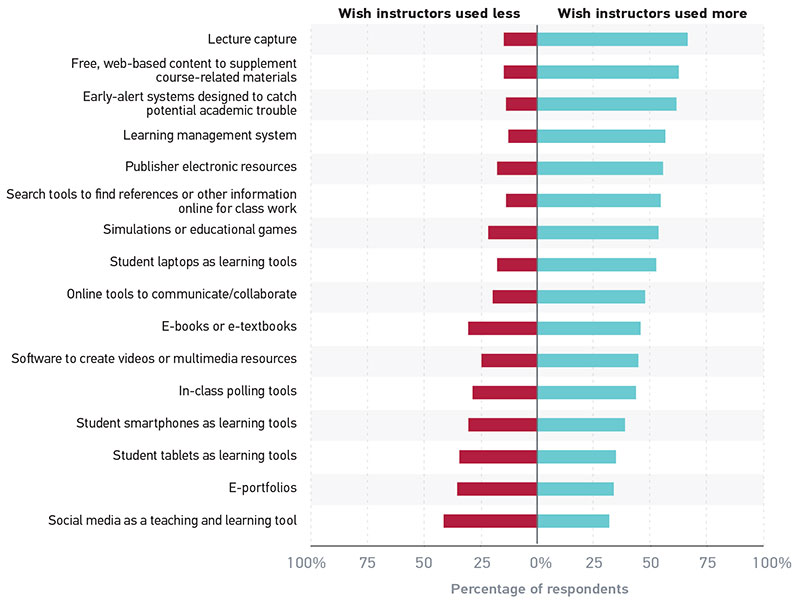
These types of functional tasks are most often conducted through an institution's LMS, the technology that is most widely used and available for teaching and learning. The majority of students are satisfied or very satisfied with the course management functions of their LMS, and they want their instructors to use these operational, functional components more. Similarly, the majority of students' open-ended responses reflected a desire for their instructors to use their LMS for these functional tasks. Open-ended responses also provided insight into why students want their instructors to use lecture capture, web-based content, and early-alert systems to enhance academic success.
In figure 4, we present students' most frequently reported "one thing" that their instructors could do with technology to enhance their academic success.2 Seven percent of students didn't answer, reported that they did not know, or indicated that the question was not applicable to them.
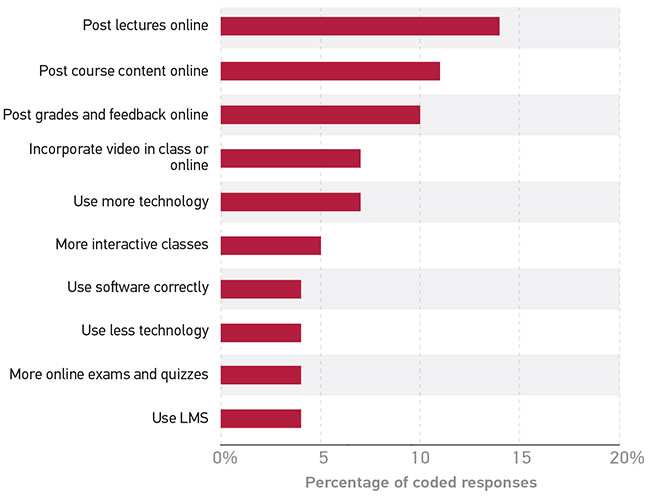
Student responses reflect a desire for their instructors to use the available technologies that have clear and immediate benefits to assist students. A majority of students reported that they wished their instructors used more lecture capture and free web-based content to supplement course-related materials. Students want instructors to use the capabilities of their institution's LMS for a more blended approach to instruction.3 Additionally, students wished their instructors used more early-alert systems designed to catch potential academic trouble. The following operational course management functions of the LMS assist students in their academic work: access to lectures, PowerPoint presentations, and instructor notes before and after instructor presentations; posting syllabi and other relevant course information; posting course content to enhance learning; and access to updated grades in the LMS gradebook. This desire to harness the potential of the LMS also reflects an anytime, anywhere perspective on the learning environment—the classroom (and its content) as a mobile learning space that is accessible 24/7.
Post Lectures and Course Content Online
Students want access to course lectures and course materials in a way that suits how they consume content; this means unrestricted access via devices, and available anytime and anywhere. Students requested that lectures be recorded and posted on the LMS so that the audio (or video) and/or lecture notes could be reviewed later, thereby increasing their understanding of course content. Many students saw the use of the LMS as enabling continued access to instructors' comments and expertise, which was viewed as a valuable study tool for their success. A student remarked, "Post lectures online. It is sometimes difficult to be able to write all your notes down when your professor is lecturing. It would be nice to be able to go back to your lectures whenever you need it." Another student suggested that transcriptions or video recordings of lectures could be posted on a public platform, such as YouTube: "I would extremely enjoy the lectures recorded and put onto a medium such as Blackboard or, failing that, YouTube. If not that, then perhaps record the lectures, then put a typed transcript of the lesson onto a medium such as Blackboard." A student stated that technology can be used to ensure class attendance even if lectures are posted online: "It personally does not deter me from attending class, because there are attendance 'clicker' points."
Students also reported that they would like instructors to use technology more often in lectures to enhance interactivity within the classroom:
Learn how to properly navigate materials available to them. This requires more work put into lectures to make them more interesting: research videos, make a Prezi, interactive polls, interactive learning games. Not just PowerPoint slide after slide. If attention levels are dropping already, imagine what the next generation's will be like.
Another student's comments also suggested that using technology in lectures can enhance student engagement and interest in course content:
I would like to see more polls or some sort of interactive program that engages people. I find myself sometimes drifting off into space when it is nonstop talking for 50 minutes, 1 hour and 15 mins, or even a 3-hour lecture. I just think if there were some sort of engagement of student-to-lecture application, it'd help people stay more attentive.
Another student suggested that using lecture capture could also free up class time for more interactive learning opportunities:
I wish the lectures were recorded and put online for me to view at my own pace. I always feel like they have to go so fast in class, but if we'd already watched the lectures then we could attend class and just ask questions or do activities to deepen the understanding. I think this is called a flipped classroom style.
These quotes indicate that students want less of the "sage on stage" (i.e., lecturing) and more of an active learning environment. Students also reported that posting course content such as instructors' lecture slides, syllabi, or assignments would benefit them in their classes. A third of students who requested that more course content be posted online specifically mentioned that they would like to see instructors' lecture slides and notes posted on the LMS. Students reported that they would like to have these resources to review prior to and after class, reflective of a "shared content" perspective whereby information is freely available from students' devices.4 A student remarked, "I would like them to utilize technology to our benefit, allowing coursework to be viewed online." Another student suggested, "Post everything online. If you give us the information in class and I missed something, I want to be able to reference it or come back to it so I don't miss anything and I do well in a course." A few students reported that having assignments online (to prereview) as well as syllabi would assist them in being more prepared for the course. For example: "I would like all of my instructors to consistently use Moodle, either to post the syllabus online or to post weekly assignments online. This way, you can always access them and plan in advance!"
Four-fifths of faculty told us in 2017 that they were satisfied or very satisfied with creating or posting content in the LMS; this was also the second most-used feature of the LMS.5 However, student responses suggest that some instructors may not be posting the content that students feel would contribute to their course performance, such as lecture slides or notes. A student observed that instructors are inconsistent in posting course content via the LMS: "Utilize all features of WebCampus [an institution-specific LMS]. Most of them use some features. A couple use it better than others, and some professors are still unwilling to accept technology use and don't post anything online. It's ridiculous."
A majority of students are satisfied or very satisfied with the functional, operational aspects of their LMS and want their instructors to use these features to enhance their academic success. Students indicated that these functional aspects of their LMS—those that assist them in the business of being students—are the features they wished instructors used more. These include posting syllabi or other course administrative information. Students want ongoing and unrestricted access to instructors' lectures, notes, and commentary on course content as well as course information and supplemental course content. Some students suggested that this access would free up class time for active learning experiences. Instructors and learners can benefit from and appreciate the active learning experience.6 This is likely why students and faculty give a similar reason for conducting particular assignments and activities (e.g., quizzes, homework) online: increased class time.7
It should be noted that lecture or PowerPoint presentations and active learning environments are not mutually exclusive. For example, the Active Learning Platform allows students to ask and answer questions, take notes, and indicate need for clarification during presentations.8 This type of technology may be well suited for instructors seeking to engage in active learning in larger classes.9 Each student action is linked to the spot in the lecture video (if available) where the action was taken, for all the class to observe. The Active Learning Platform allows the instructor to monitor and answer questions from students during or after class, and data on student participation can be downloaded on a class-by-class basis. This provides the instructor with information on what students are doing while in class as well as online.
A student's response reflected a perception that instructors avoid posting materials online so as to encourage attendance: "I wish that instructors would make all information available in class also available online. Withholding information isn't an adequate method to encourage attendance." What are students' perspectives on the relationship between attendance and instructors' delivering content via the LMS? Forty-two percent of students disagreed/strongly disagreed that they were more likely to skip face-to-face classes if streamed or recorded lectures were available online. Conversely, 38% of students agreed/strongly agreed that they would skip classes if streamed or recorded lectures were available online. Slightly more students (45%) disagreed/strongly disagreed that they were more likely to skip face-to-face classes if materials presented in class were available online, compared with 34% who reported they would skip class if these materials were available. The percentage of students (little more than a third) who said they'd skip may reflect what is happening during class time. Instructors may be using class time primarily as a means to communicate course content (via lectures and lecture slides) and to provide time for in-class discussion. If this is the case, then it makes sense for a third of students to report they'd not attend classes if what they primarily experience in class is the same as what they can obtain online, i.e., PowerPoint slides.
This shared preference among students and faculty for increasing class time (by posting content, activities, and assignments via the LMS) to engage in active learning suggests that students and faculty are likely open to a blended learning environment that lends itself to a flipped classroom. Student and faculty preferences for LMS utilization reflect a partiality for blended learning environments, where online and face-to-face components are both used for teaching and learning.10 Blended learning environments have been demonstrated to be more effective than either online only or face-to-face only environments. Student responses indicate that increased use of the functional, operational elements of the LMS can enhance their academic success.11
The flipped classroom enhances student experiences by placing more of the responsibility for learning on students while allowing them room to experiment with course ideas and concepts.12 The flipped classroom also enables the instructor to be present and to offer guidance for students during active learning exercises.13 The available class time in a flipped learning environment can then be used for discussion, collaboration, student engagement in higher-order thinking tasks, and the application of skills to complex problem-solving exercises.14
Although posting online content and lectures offers opportunity for the blended, flipped classroom, it still uses the LMS as a course administration system rather than a learning tool. Indeed, students are less satisfied with the more complex system functions of the LMS than with its basic management features, such as accessing course content. The lower satisfaction with the more complex LMS functions may be the result of LMS limitations.15
Rather than a management system, a digital learning environment that enables customizable, student-centered interactive components is needed. These next generation digital learning environments (NGDLEs) are not single applications, like an LMS. NGDLEs can include personalization; interoperability; collaboration; accessibility and universal design; and analytics, advising, and learning assessment. NGDLEs may or may not include an LMS among their components; the LMS may be used solely as a supplement to these open-standard digital applications, tools, and resources.16 Students' open-ended responses, along with their lower satisfaction with the more complex features of their LMS, suggest that students may be open to the more interactive and collaborative opportunities offered by an NGDLE.
Post Grades and Feedback Online
Knowing is half the battle. The more students know, the more they can assess their progress in their courses and respond accordingly. A student reported, "There are classes where I have no idea what my grade is." This student experience reflects the exact opposite of what we know is best for student (and instructor) success. Ongoing instructor feedback (i.e., formative feedback) regarding performance can enhance student success and allow students to make adjustments during the course to improve performance.17 Ongoing assessment and feedback also allows instructors to adjust their approaches to improve students' outcomes.
Students want grades posted in a timely manner, which they believe would enhance their academic success. A student reported that being able to consistently review grades online enables tracking performance in the course: "I would like ALL instructors to be required to post grades online. It's hard to figure out where you stand in a class or what you need to make on a final to keep a certain grade when they keep this information to themselves." Often, students requested posting grades and feedback so that they can know exactly where they stand in the course. It also allows them to review specifics on what instructors identify as needing improvement: "Grade assignments online and comment on [why] they take points off [in assignments and assessments]. Not all professors do this, and it saves a lot of time to just see it online rather than having to wait in a line of 10 people to see what I got points off for." Another student remarked that having this real-time access would enable altering study habits to ensure success: "I would like my instructors to allow me better access to my most up-to-date grades online so that I know how I am doing in the course, and if I need to change my study habits or hours devoted to that course." Many students reported that their instructors use their LMS to post grades, but frequently the most current grades are not posted. As the previous quote indicates, knowing grades throughout the term rather than just during the last month of the course may be one of the key advantages students allude to in their responses.
Instructors' use of an LMS to update grades weekly may benefit students who are struggling or unsure of their current, calculated grade during the term. Although not all students provided deep explanations for why they want their instructors to post online grades, many reported that knowing their standing in a course (via the course LMS) throughout the term enhanced their academic success. A student suggested that the LMS could accurately track grades but felt that instructors needed to better use the available technology: "Learn how to use Canvas. They [instructors] always claim it doesn't 'do the grades correctly,' but in reality Canvas can do drops, minimum scores, curves, grade weights, categories. The professors just don't know how to use it." This last comment suggests that instructors may not know all the features available in their LMS gradebook, and additional opportunities for instructors to learn how to leverage its capabilities could enable the real-time grade-posting students desire.
Student Success and the LMS
Students' desire for the LMS to have up-to-date grades aligns with higher education institutions' current strategies to enhance student success.* The LMS is an important tool to help instructors and student support staff flag students who are not engaging in courses or who are at risk of not completing a course. This early-alert system can not only notify instructors and support staff but also be used to link a student to an intervention. For example, a writing assignment completed through the LMS that receives a low grade could send an electronic message prompting that student to make an appointment at the writing center. The LMS gradebook data can then be used to monitor progress after the student engages in the intervention (writing center appointment), which can inform macro-level analytics on which interventions are working best (or not) for which students. By harnessing the LMS data, staff and administrative stakeholders can more accurately assess which students need interventions, who benefits from which interventions, and whether these benefits carry over to other courses. Knowing is half the battle for students; use of the LMS real-time grade functions can ensure that stakeholders who have decision-making power are also "in the know."
* John Suess and Henry Childers, "Modeling an IT Strategy for Student Success," EDUCAUSE Review, November 14, 2016.
Students' responses reflect the need for real-time grade information that identifies whether they are at risk in any course they are presently taking. Empirical research suggests that access to the LMS gradebook can benefit student performance.18 Instructors who used the grade center in their LMS reported that their students were more likely to earn a C or better. Freshmen with high LMS activity in the grade center were up to three and a half times more likely to earn at least a 2.0 GPA.
Notes
-
D. Christopher Brooks, ECAR Study of Undergraduate Students and Information Technology, 2016, research report (Louisville, CO: ECAR, October 2016).
↩︎ -
A total of 1,125 coded segments of data were derived from 1,100 open-ended student responses. Responses often had co-occurrence of codes and were not limited to single codes. Responses lacking substance (e.g., "not applicable") were removed from the sample. Denominator to calculate percentages is based on total number of substantive coded segments (1,125) rather than total responses. Figure 4 presents the top 10 codes within these responses, which represent 64% of all student coded responses (or segments of coded data). For complete frequencies for this coded response, see Appendix B.
↩︎ -
We use "blended" in the broadest definition of the term. For more discussion, see Jeffrey Pomerantz, Malcolm Brown, and D. Christopher Brooks, Foundations for a Next Generation Digital Learning Environment: Faculty, Students, and the LMS, research report (Louisville, CO: ECAR, January 2018).
↩︎ -
This desire for content sharing aligns with iGen's and Millennials' embracing shared content, or "transparency-engendering online tools." See, for example, Janna Anderson and Lee Rainie, "Will Millennials 'Grow Out' of Sharing?" Pew Research Center, July 9, 2010.
↩︎ -
Jeffrey Pomerantz and D. Christopher Brooks, ECAR Study of Faculty and Information Technology, 2017, research report (Louisville, CO: ECAR, October 2017).
↩︎ -
For an example of a university's active learning initiative, see James Juergensen, Tina Oestreich, Brian Yuhnke, Michael Kenney, Katie Skapin, and Wendy Shapiro, "Active Learning at Case Western University," EDUCAUSE Review, January 26, 2015.
↩︎ -
Pomerantz, Brown, and Brooks, Foundations for a Next Generation Digital Learning Environment.
↩︎ -
Perry Samson, "Promoting Engagement in Larger Classes," EDUCAUSE Review, August 17, 2015.
↩︎ -
James Juergensen, Tina Oestreich, Brian Yuhnke, and Michael Kenney, "New Challenges to Active Learning Initiatives," EDUCAUSE Review, January 25, 2016.
↩︎ -
Pomerantz, Brown, and Brooks, Foundations for a Next Generation Digital Learning Environment.
↩︎ -
Barbara Means, Yukie Toyama, Robert Murphy, Marianne Bakia, and Karla Jones, Evaluation of Evidence-Based Practices in Online Learning: A Meta-Analysis and Review of Online Learning Studies, U.S. Department of Education, revised September 2010.
↩︎ -
EDUCAUSE Learning Initiative, "7 Things You Should Know about Flipped Classrooms," February 7, 2012.
↩︎ -
For examples of how technology is being leveraged for active learning opportunities, see EDUCAUSE Learning Initiative, "7 Things You Should Know about Emerging Classroom Technologies," April 9, 2018.
↩︎ -
Pomerantz, Brown, and Brooks, Foundations for a Next Generation Digital Learning Environment.
↩︎ -
None of these more complex features has more than a 20% student dissatisfaction rate. A plurality of students reported they were "neutral" when asked about their evaluation of the more complex features of their LMS, such as engaging with other students, collaborating on projects, and participating in study groups.
↩︎ -
Malcolm Brown, Joanne Dehoney, and Nancy Millichap, "What's Next for the LMS?" EDUCAUSE Review, June 22, 2015.
↩︎ -
Doris Cheung, "Optimizing Student Learning with Online Formative Feedback," EDUCAUSE Review, April 4, 2016.
↩︎ -
John Fritz and John Whitmer, "Learning Analytics Research for LMS Course Design: Two Studies," EDUCAUSE Review, February 27, 2017.
↩︎