Despite the prevalence of instant messaging, video conferencing, and social media, e-mail remains a fundamental communication medium on higher education campuses. Faculty, staff, and students still use e-mail for personal and campus-wide messaging. As with campus networks, users rely on e-mail 24/7, access their e-mail anytime, anywhere. Today, more IT organizations are outsourcing e-mail to meet users' 24/7 expectations and to free staff resources for more strategic activities. One migration path is to transition e-mail from a stand-alone service to a broader, cloud-based tool suite such as Google's G Suite or Microsoft's Office 365. These suites go beyond e-mail and integrate calendar, contacts, productivity software, and more so that users can collaborate more productively.
The Market
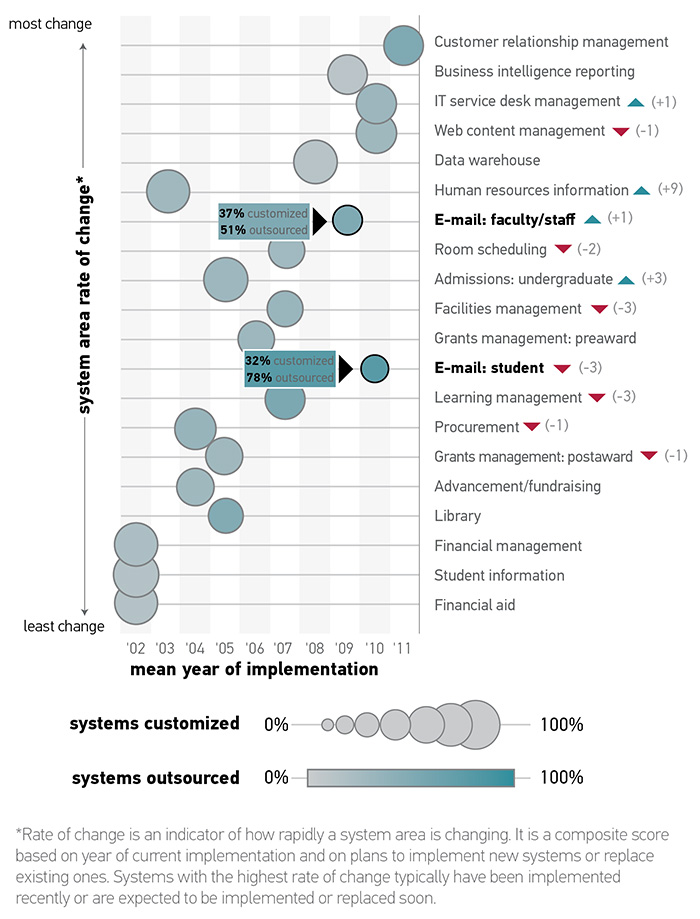
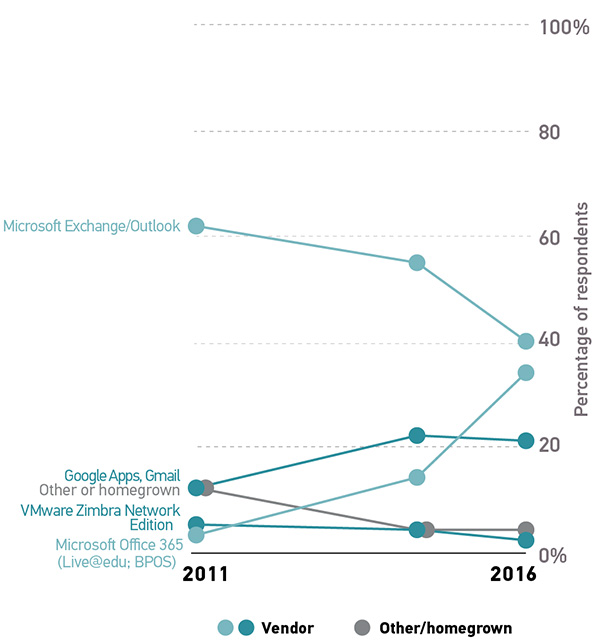
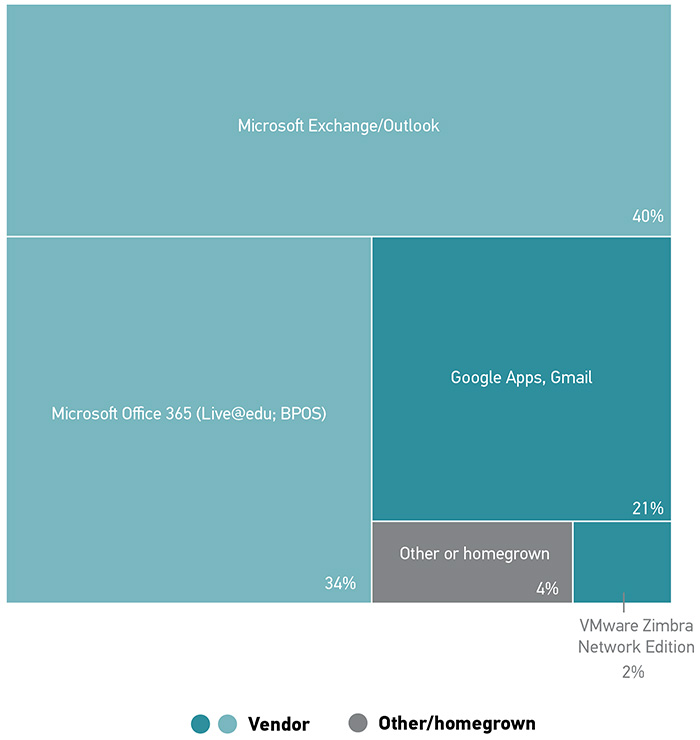
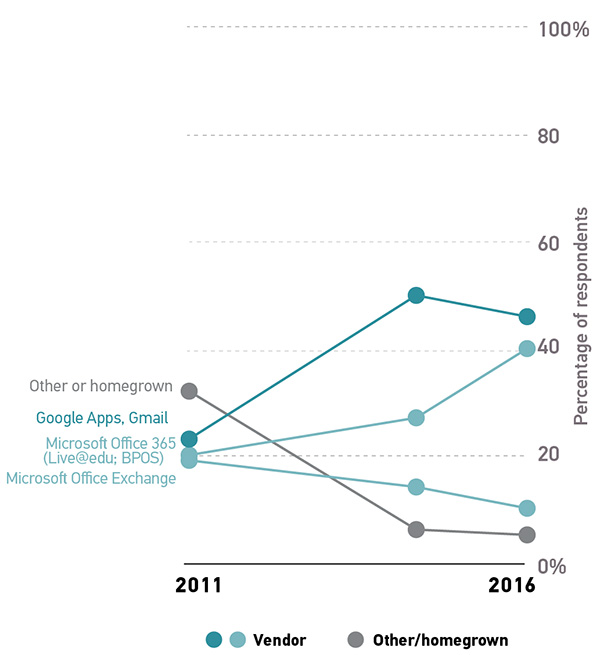
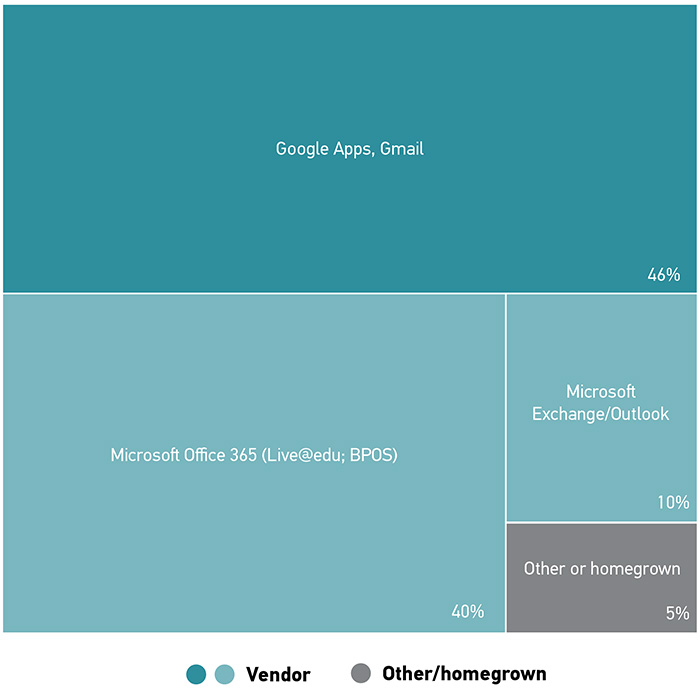
As institutions settle the student e-mail space and move on to address faculty/staff e-mail systems, we see student e-mail systems drop in our rate-of-change ranking and faculty/staff e-mail systems climb a spot (figure 11). For faculty/staff e-mail, Microsoft continues to dominate the market (74%; figures 12 and 13), although we are seeing a shift away from Exchange (62% in 2011 versus 40% in 2016) in favor of Office 365 (3% in 2011 versus 34% in 2016; figure 12). Between 2011 and 2016, Office 365 has also made strides in the student e-mail space (20% in 2011 versus 40% in 2016; figure 14). However, the market leader for student e-mail remains Google Apps/Gmail in 2016 (46%; figure 15).
Case Study: Extensive Preparation Key to Texas State University’s Smooth E-Mail System Migration
For many institutions, e-mail is still the backbone communication channel. With any new e-mail system implementation, a smooth transition is essential to minimizing disruption to daily activity. Texas State University (TXST) Division of Information Technology (IT) recognized this challenge when it migrated 75,000 faculty, staff, and student e-mail accounts to a new system in December 2016.
TXST's previous e-mail system was a locally hosted, 2010 version of Microsoft Exchange. But its e-mail system servers had reached the end of their life cycle, and equipment replacement required a significant investment. So TXST IT opted to add cloud-based e-mail to its Office 365 subscription service contract. Besides foregoing the equipment replacement costs, the subscription upgrade enabled TXST IT to save additional funds by moving other locally hosted services to Office 365, creating a more integrated suite of Office 365 tools, such as easier sharing and collaboration of OneDrive documents via e-mail. TXST benefited in other ways, too. For example, a cloud-based e-mail system reduced TXST IT's support efforts, and e-mail users had a larger 50-gigabyte (GB) mailbox.
Kenneth Pierce, vice president for information technology and CIO, knew how disruptive an e-mail transition could be, having experienced a two-month e-mail system migration at his former institution. "Staggering e-mail account switchover has a big domino effect across the campus," explained Pierce. "You must anticipate all the implications when you switch over one area in order to minimize disruptions to any related departments. You're much better off if you can migrate your e-mail system in a short period of time." So TXST IT opted for a three-day, flip-the-switch approach, but underlying this quick switchover was a half a year of preparation:
- Throughput optimization: This was the bottleneck in Pierce's previous e-mail transition, where only 500–600 accounts per night could be moved over to the new system—a rate that would have taken more than four months to transition TXST's 75,000 e-mail accounts. TXST IT coordinated with Microsoft's Office 365 team to fine-tune throughput and to prioritize transmission of TXST's e-mail accounts to Microsoft's cloud environment. "This was huge, and in fact Microsoft was shocked that we were able to tweak our systems into moving accounts through so quickly," stated Pierce. "They told us it couldn't be done." Another factor in TXST IT's favor was the former e-mail system's relatively small 2 GB mailbox size, making it faster to migrate each individual account.
- System testing: TXST created a test Microsoft e-mail cloud to identify and fix potential problems before the actual migration. It ran various scenarios with 100 test e-mail accounts—e.g., transmitting a larger-than-allowed e-mail attachment—to see how it impacts migration time and then scripted fixes in the TXST environment or worked with the Microsoft team as needed.
- Power user testing: TXST IT consulted e-mail power users—most notably executive assistants who manage several calendars—to better understand how they use e-mail, calendars, and other related tools. "It is far more complicated for them than for me looking at my e-mail and calendar," explained Pierce. "They're in and out of these shared calendars all day long. Any glitch in the new system would impact them hugely, and we needed to meet their needs."
- Communication plan: TXST IT created a communications strategy to prepare the TXST community for the e-mail switchover and to educate them about access and use of Office 365's integrated toolset.
Even with this preparation, however, TXST IT learned it is difficult to consider all potential issues beforehand. "We felt we had it down to the point where overnight, the e-mail accounts were going to flip over, and folks were just going to respond and connect to their new mailbox," said Pierce. "It worked that way for many, but not for everyone." For example, an individual's smartphone e-mail configuration impacted the e-mail account migration. The migration may have worked for one person's Samsung's S5 but not another's S5, depending on how the person configured their e-mail apps. Microsoft Office 365 required a person's real ID for the e-mail migration—aliases didn't work. Some people may not have realized they used an alias, which would cause their access to Office 365 to fail unexpectedly. Problems like these impacted only a small percent of the TXST's 75,000 e-mail accounts, but every percent translated into 750 users. So TXST IT fully staffed and extended its help desk hours during and after the migration to resolve these individual situations.
In addition, the e-mail migration brought home broader issues that became apparent only after the switchover. One example was the unexpected popularity of web-based e-mail and the need to anticipate for differences between desktop and web e-mail interfaces. After the migration, some people complained that "Reply All" was now their default reply setting and preferred instead a "Reply to Individual" setting. But this problem did not appear on TXST IT desktop e-mail interface. After digging a bit deeper, TXST IT realized "Reply All" was the default setting on the web version and provided education for users to reset the web interface setting accordingly. Another issue was the differences between Exchange 2010 and Office 365. TXST leapfrogged the 2013 version, and there were considerable differences in functionality, features, and settings between the 2010 and Office 365 versions. One example was a default global meeting invitation button that automatically invited all the individuals on "Reply All" distribution list. To put it in perspective, if this button is turned on, the president's office could receive several hundred meeting requests from individuals responding to a campus-wide e-mail invitation to a special event. TXST's first exposure to this feature was in Office 365 e-mail, and TXST IT team turned off the feature after recognizing the problem.
The key lesson is to never underestimate any system's impact on the institution. E-mail is not a cutting-edge technology, and the temptation may be to downplay a new e-mail system's migration requirements. But TXST IT understood e-mail's impact on day-to-day activities and worked hard before and after its new system switchover to minimize institutional disruption.